HairApp: AI Hairstyle Try On
- 4.2
- Rating
- 1.00M
- Installs
- Free
- Price
 Analysis by App-foxy
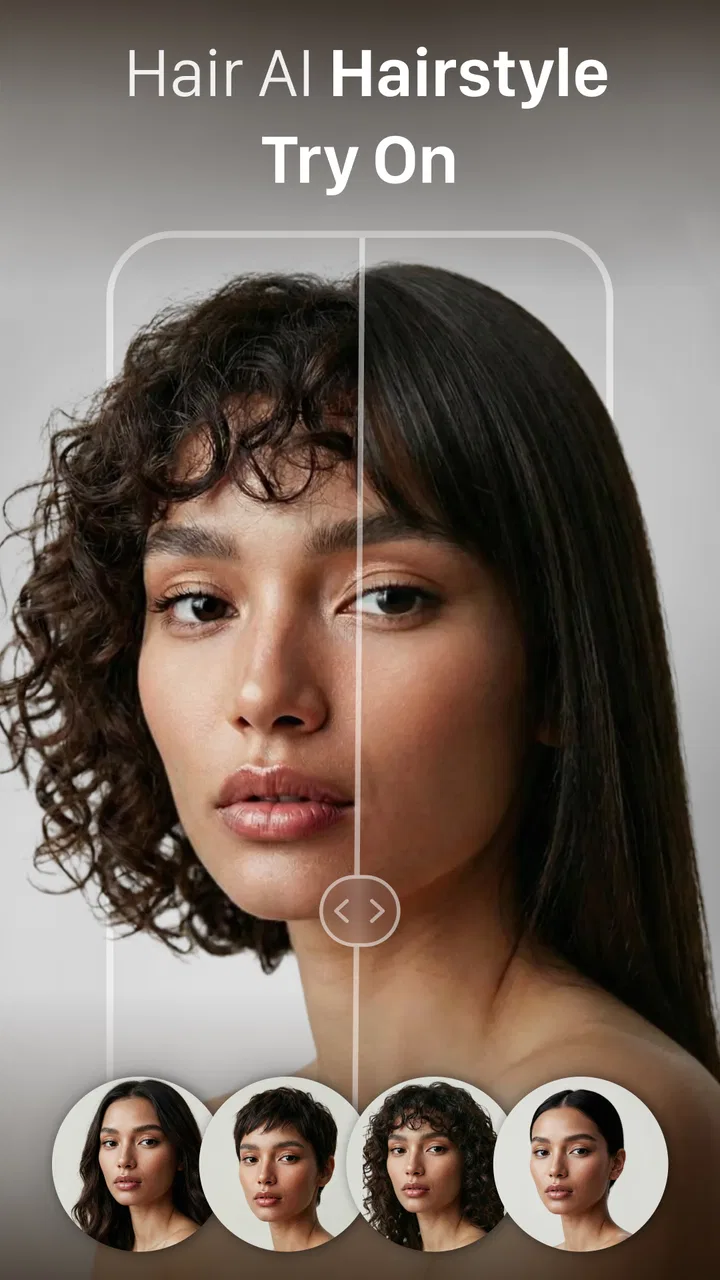
HairApp: AI Hairstyle Try On is the kind of photography app I open when I want to explore a change without immediately booking a salon appointment. Its central idea is simple: use a selfie to preview different hair directions, experiment with colour, and get a little help thinking about what might suit your face. After spending time with it, my view is that it works best as a visual brainstorming tool rather than a final decision-maker. It can turn a vague thought such as “maybe I need a shorter style” into something concrete, but the result should still be treated as an approximation.
That distinction matters. A generated hairstyle can look convincing enough to start a conversation, yet it cannot fully show how a cut will behave with your actual hair texture, density, growth pattern, or daily routine. I found the app most useful when I used it to narrow down ideas and identify what I definitely did not want. If you approach it with that realistic expectation, it offers a convenient and entertaining way to explore your appearance.
What the app does well in everyday use
The strongest part of the experience is the speed of visual comparison. Instead of searching through unrelated hairstyle photos and trying to imagine yourself in them, I could work from my own face. That makes the decision process more personal. A style that looks attractive on a model may not create the same balance on my features, while a less obvious option can become more appealing once I see it adapted to my image.
You May Also Like

 Blood Strike: 2.5 Anniversary
Blood Strike’s Loadouts Turn Every Drop Into a Tactical Gamble
A close look at Blood Strike’s custom loadouts: how fast access to signature weapons reshapes its battle royale rhythm, rewards preparation, and narrows the gap between fights.

 Pandora - Music & Podcasts
Pandora’s Music Is Easy to Start, but Harder to Recover
Pandora’s strength is its low-effort path from a seed to a station. Its weak spot is how much confidence it asks you to place in connection, setup, and quiet recovery.

 8 Ball Pool
 Is Built on Rivalries, Rematches, and Routine
A close look at the rivalries, rematches, shared routines, and unanswered safety questions that turn a quick pool match into a persistent mobile community.

 Samsung Music
’s Quiet Strength Is Playing What You Already Own
Its reach comes less from spectacle than from dependable access to a personal library. That simplicity is both the app’s strongest retention engine and its ceiling.

 AccuWeather: Weather Radar
AccuWeather Review: A Quick, Clear Forecast for Everyday Decisions
For everyday plans, the best forecast is the one you can understand quickly. AccuWeather makes rain timing, radar, and local conditions easy to act on, with a few trade-offs.

 Hill Climb Racing
Why Hill Climb Racing Still Turns Crashes Into One More Run
A tiny car, a bumpy hill and one more upgrade: Hill Climb Racing keeps resurfacing because its simple chaos makes every near-miss feel personal.
More From Our News Desk



The app brings several related ideas together: hairstyle previews, colour exploration, facial analysis, and haircut try-on effects. That combination gives it a broader role than a basic filter that merely adds a fixed wig-like overlay. I could move between the creative side of choosing a look and the more analytical side of considering how a style might frame my face. I would not treat the analysis as professional cosmetic advice, but it can provide a useful prompt when I am stuck between several possibilities.
One practical strength is that it lowers the emotional cost of experimentation. Hair changes can feel surprisingly personal, especially when the desired cut is dramatic or the colour is far from what I normally wear. Trying an idea digitally first lets me react privately. I can save the concepts I like, discard the awkward ones, and discuss the remaining options with a stylist without relying on a vague description.
For a realistic test, I would take a clear, front-facing selfie in even light, with the hairline visible as much as possible. I would avoid a heavily angled pose or a photo with strong shadows across the face. This is not just about making the preview prettier. The clearer the source image, the easier it is to judge the shape around the forehead, cheeks, and jaw. A poor selfie can make a good style look wrong and can also make comparisons inconsistent.
Another useful workflow is to change only one variable at a time. I first compare cut length while keeping the colour close to my current shade. Then I look at colour options using the style I prefer. If I change cut, colour, and overall mood in one step, it becomes difficult to understand what I actually like. This simple sequence turns the app from a novelty into a small decision-making aid.
The colour tools are especially helpful for people considering a noticeable change but feeling uncertain about intensity. I can compare a familiar tone with something more adventurous and see whether the overall effect feels balanced. The preview cannot reproduce every real-world detail, such as how colour reflects under indoor lighting or how maintenance affects the shade over time, but it gives me a starting point for a more informed discussion.
I also like using the app in reverse: not to choose a new style, but to rule out options. Sometimes a haircut looks appealing in isolation, yet feels too severe or too high-maintenance when placed on my own face. That negative information is valuable. It can prevent an impulsive request at the salon and help me describe the boundaries of what I want.
A less obvious use is preparing for a consultation when I do not know the right vocabulary. Rather than telling a stylist only that I want “something different,” I can bring a few visual references from my experiments and explain which parts work for me. I might prefer the length from one preview, the fringe from another, and the colour from a third. The app does not replace that professional conversation, but it can make the conversation more precise.
HairApp is free to install, which makes this kind of experimentation easy to try without committing money at the outset. Some parts of the experience may involve in-app purchases priced from $7.99 to $39.99 per item, so I would check what is available before assuming every option is included. The free entry point is appealing, but the potential cost of extended use is an important part of deciding whether it fits your habits.
The app comes from xLabs Dijital Hizmetler Anonim Şirketi and is listed in the photography category. Its current version is 1.0.64, and it requires iOS or Android 12 or later. That operating-system requirement is worth checking before downloading, particularly if you use an older phone. On a compatible device, the experience feels aimed at quick personal exploration rather than professional image production.
Its audience is already fairly broad: the app is marked for Everyone, and it has passed the half-million-install mark. The average rating is 3.9 from roughly twenty-eight thousand ratings. I read that as a sign of a useful but not universally perfect experience. There is enough interest to show that the concept connects with many people, while the rating also suggests that expectations should remain practical rather than treating every result as salon-accurate.
Where the previews need careful interpretation
The biggest weakness is the gap between a generated image and a real haircut. A preview can suggest the outline of a style, but it cannot tell me how many minutes I will spend styling it each morning, whether my hair will hold the shape, or how the cut will look several weeks after the appointment. Those details often determine whether a hairstyle is genuinely suitable.
This is particularly important for textured, very thick, very fine, or naturally curly hair. A digital result may smooth over the differences that make a cut behave differently in real life. I would therefore use the app to communicate a direction, not to demand an exact copy. A stylist can assess the condition and movement of the hair in a way a selfie-based tool cannot.
Lighting also affects my confidence in colour previews. A shade that looks subtle on a bright screen may appear stronger in ordinary indoor light, while a darker image can make a tone seem dull. I would compare several previews under a sensible viewing setup and avoid making a permanent colour decision from one generated picture. Temporary colour or a professional consultation may be a better next step for anyone considering a major change.
The facial-analysis element deserves the same caution. I see it as a way to prompt questions about proportions and framing, not as an objective verdict about what I should look like. Personal taste, cultural style, comfort, and maintenance are just as important as any visual suggestion. A style that does not match a generalized recommendation can still be the right choice if it suits my personality and routine.
There is also a risk of over-comparing. Because digital experimentation is fast, I can easily spend more time chasing the most flattering image than thinking about what I can realistically maintain. My best results came when I limited myself to a small shortlist and wrote down why each option appealed to me. That kept the tool focused on a decision instead of turning it into an endless stream of cosmetic possibilities.
People who want precise, professional-level colour simulation may prefer a salon consultation or a specialist tool designed around a particular brand’s products. Someone who simply wants a large collection of playful visual effects may also find a general social camera app more suitable. HairApp makes more sense for users who want the hairstyle decision itself to be the centre of the experience.
How I would use it before a real appointment
My preferred process begins with three or four photos rather than one hurried selfie. I would choose a neutral expression, keep the camera at eye level, and make sure the face is not hidden by sunglasses, a hand, or a dramatic filter. I would then test broad changes first: shorter versus longer, more open around the face versus more covered, and natural versus bold colour.
Once I identify a promising direction, I would repeat it with a second image. If the idea only looks good in one carefully chosen photo, I would be cautious. If it remains appealing across different expressions and lighting conditions, I would feel more confident using it as a reference. This is a small but meaningful improvement over judging a style from a single polished preview.
For a salon visit, I would bring a shortlist rather than one supposedly perfect result. I would explain what I like about each image and what I want to avoid. For example, I might like the general length but not the amount of hair across the forehead. That kind of explanation gives the stylist room to adapt the idea to my actual hair instead of treating the generated image as an instruction.
For a colour change, I would separate “I like this tone” from “I am ready for the maintenance.” A digital preview can help me discover whether warm, cool, light, or deep shades appeal to me, but it cannot turn a high-maintenance colour into a low-maintenance one. I would ask about upkeep, fading, and the condition of my hair before making a permanent choice.
Parents and younger users should also remember that the Everyone label describes the app’s content rating, not the wisdom of every appearance decision. The same applies to any adult who feels pressured to change because an algorithm presents a more polished image. I found the app healthier to use when I treated it as a creative mirror, not as a judge of whether my current appearance was acceptable.
Who should try it, and who should skip it
I would recommend it to someone preparing for a haircut, considering a new colour, or trying to find language for a style they have seen elsewhere. It is also a good fit for people who enjoy visual planning and want to compare ideas privately before showing them to friends or a stylist. The free installation makes a quick trial reasonable, provided the possible paid items are understood before spending.
It is less suitable for anyone expecting an exact preview of the finished salon result. Users with highly specific technical requirements, such as a precise layered structure or a colour that must match a professional swatch, should use the app only as an early reference. A stylist with direct access to the hair will provide more dependable advice.
I would also skip it if my main goal were advanced photo editing unrelated to hair. This is not the app I would choose for broad retouching, detailed manual adjustments, or a full photography workflow. Its value comes from concentrating on hair and face-related experimentation. That focus is a strength for the right user, but it naturally limits its usefulness outside that purpose.
One final practical point is device compatibility. Because the minimum requirement is Android or iOS 12, owners of older phones should check their operating system before planning around the app. On supported devices, I would still keep expectations moderate: the most useful output is a shortlist of ideas and questions, not a guaranteed preview of tomorrow’s appearance.
My final take
After using HairApp as a planning tool, I think its clear thesis is easy to defend: it makes hair experimentation more personal and less intimidating, but it does not replace real-world judgement. The combination of hairstyle previews, colour exploration, and face-oriented guidance gives me more to work with than a single static filter. Its best contribution is helping me move from uncertainty to a concrete conversation.
The limitations are equally clear. Generated images can simplify hair texture, lighting, upkeep, and the practical demands of a cut. The possibility of in-app purchases means I would review the available options carefully rather than assuming the whole experience is included at no cost. The age rating and broad availability make it approachable, but approachability should not be confused with professional accuracy.
For me, the app earns a recommendation for curious users who want to test ideas before making a change. I would use it before an appointment, keep the shortlist small, and show the results to a stylist as inspiration. I would not use it as the sole reason to choose a dramatic cut or permanent colour.
My bottom line: HairApp is most valuable when it turns “What would I look like with this?” into a better-informed, more realistic decision. If that is what you need, it is worth exploring. If you want an exact simulation or professional hair advice, a real consultation remains the stronger alternative.
FAQs for HairApp: AI Hairstyle Try On
01What features does HairApp: AI Hairstyle Try On offer?
HairApp provides a range of features including AI-driven hairstyle try-ons, color simulations, and personalized style recommendations. Users can upload their photos and experiment with various hairstyles and colors in real-time. The app also allows users to save and share their favorite looks, making it easy to get feedback from friends or hair professionals.
02Is HairApp: AI Hairstyle Try On free to use?
HairApp offers a free version with basic features, allowing users to try a limited selection of hairstyles and colors. For access to the full range of styles and advanced features, such as high-resolution simulations and personalized recommendations, users can opt for a premium subscription. Pricing details are available in the app store.
03How accurate are the hairstyle simulations in HairApp?
The app uses advanced AI technology to deliver realistic hairstyle simulations, aiming to provide an accurate preview of how a particular style or color would look on a user. While the simulations are generally reliable, actual results may vary based on factors like hair texture and lighting conditions in the uploaded photo.
04Can I use HairApp to get advice from hair professionals?
HairApp allows users to share their hairstyle try-ons with friends and hair professionals directly from the app. While the app itself does not provide professional advice, this feature makes it easy to get feedback and suggestions from experts, helping users make informed decisions about their new look.
05What devices and operating systems are compatible with HairApp?
HairApp is available for both Android and iOS devices. It supports a wide range of smartphones and tablets, ensuring smooth performance across different platforms. Users should ensure their device is running the latest version of the operating system to enjoy all features and receive updates efficiently.
Pros
- Wide variety of hairstyles to choose from.
- Realistic AI rendering of hairstyles.
- Easy-to-use interface.
- Quickly switch between styles.
- Supports photos from gallery.
Cons
- Some styles require in-app purchases.
- Occasional lag in rendering.
- Limited options for men's hairstyles.
- Requires a stable internet connection.
- Ads can be intrusive.

HairApp: AI Hairstyle Try On
Gallery